
Appearance
Rover Business Suite: Settings Overview
3 min read
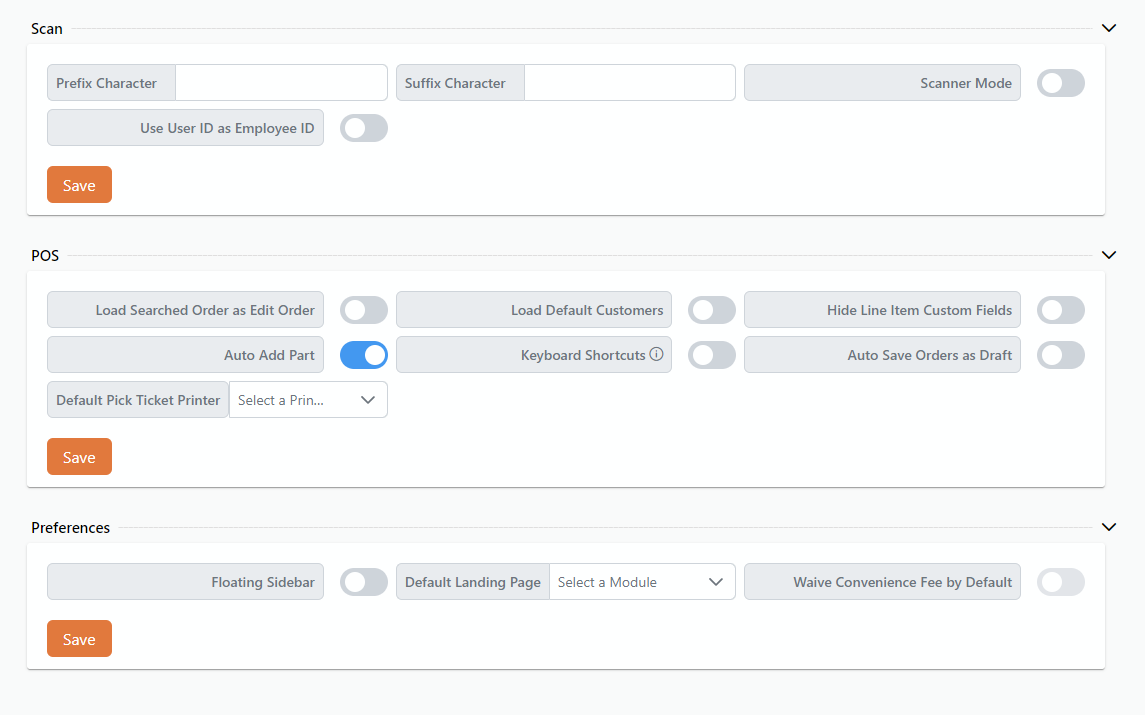
Rover Business Suite has many user settings which allow users to enable and disable application functionality local to their device.
Scan
Scan settings allow users to set up their own preferences for Rover Scan.
Prefix Character
Allows the user to specify a character that will be automatically added at the beginning of scanned data.
Suffix Character
Allows the user to specify a character that will be automatically added at the end of scanned data.
Use User ID as Employee ID
A toggle switch that, when enabled, automatically uses the User ID as the Employee ID throughout the system. This functionality applies to key actions such as starting a job, ending a job, and completing work orders.
Scanner Mode
A toggle switch that allows users to enable or disable scanner mode. When enabled, scanner mode will apply to all applicable input fields, facilitating seamless data entry using a scanner.
POS
Load Searched Order as Edit Order
A toggle switch that, when enabled, ensures that after a customer is selected and an order is searched for, the order opens in edit mode instead of finalize order mode.
Load Default Customers
A toggle switch to automatically load all customers table by default when entering the POS module.
Hide Line Item Custom Fields
A toggle switch to hide custom fields in cart view.
Auto Add Part
When a part number is entered in the POS search and a matching item is found, it will automatically be added to the cart upon completing the search.
Keyboard Shortcuts
Toggle to turn keyboard shortcuts on and off.
Auto Save Orders As Draft
A toggle switch that enables automatic, continuous saving of an order without requiring manual intervention. When activated, any changes made to an order are automatically saved in real-time, ensuring no data is lost due to user oversight or unexpected interruptions.
Default Pick Ticket Printer
A dropdown menu to select the default printer for pick tickets.
Preferences
Floating Sidebar
A toggle switch to enable or disable a floating sidebar.
Default Landing Page
A dropdown menu to select the default module or page upon login.
Waive Convenience Fee by Default
A toggle switch to automatically waive convenience fees when paying an invoice.
Actions
Save Button
A button to save all current settings and preferences.