
Appearance
POS Shipping - Formsdef Based Shipping Header Input
9 min read
Table of Contents
- Overview
- Prerequisites
- Ship Submit Mode Options
- Additional Shipping Information Form
- Ship Validate V2
- Complete MRK.CONTROL Sample Response
Overview
This feature allows the POS shipping workflow to display a dynamic, host-driven form for collecting additional shipping header information before an order is shipped. The form is defined using the existing FORMSDEF system with a module of SALES, and is configured through the MRK.CONTROL response.
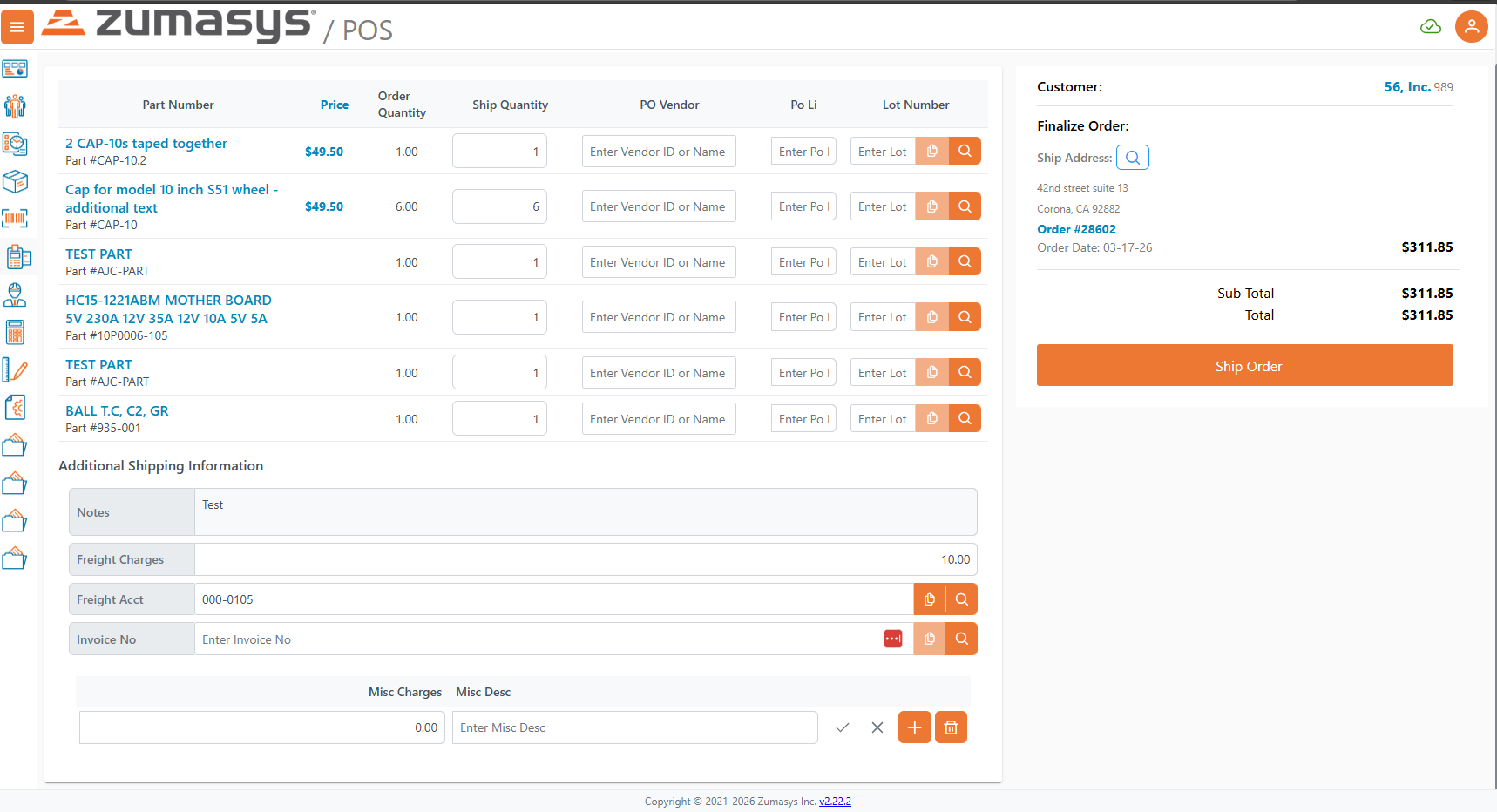
Additionally, the ship submit button on the Orders page can be configured with Quick Ship and Detailed Ship modes, allowing the host to control which shipping options are available to the user and which is the default.
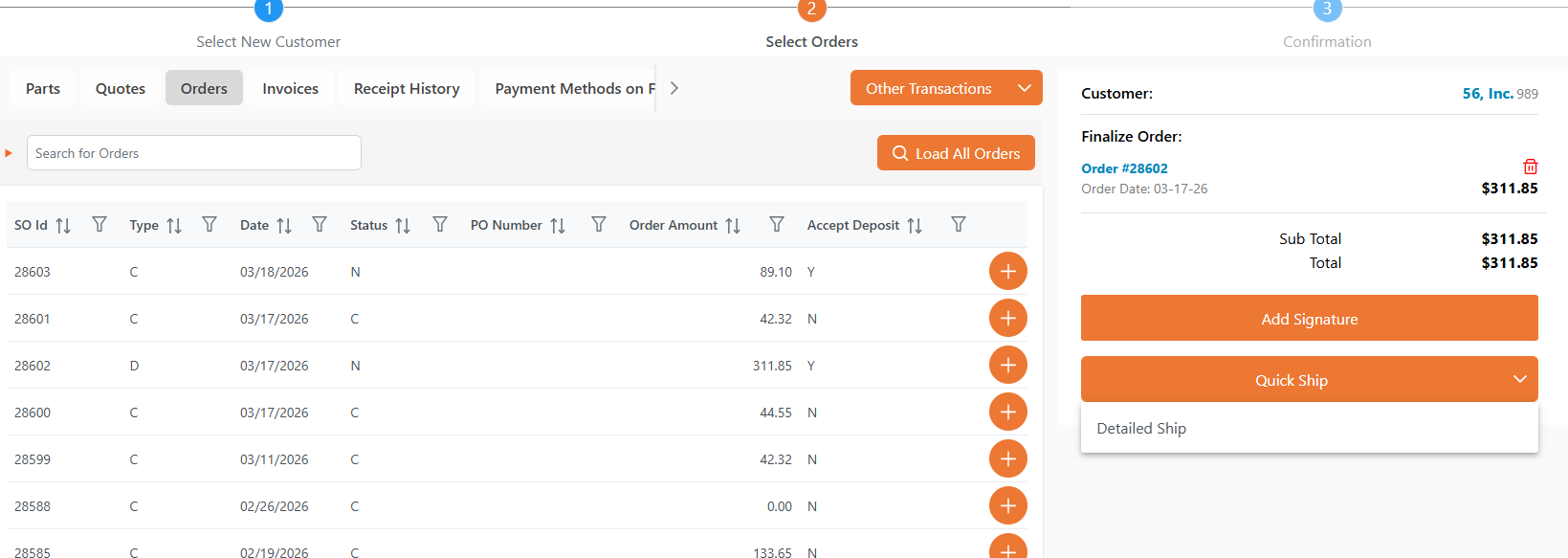
Prerequisites
- The FDICT for the SHIP file must include a
validate_bp_itemsentry withvalidate_verof 2 to enable Ship Validate V2 capabilities (required for field-level validation on the additional shipping form). - A FORMSDEF record must exist with the
moduleset to SALES andenabledset to Y. - The fields referenced in the FORMSDEF
field_itemsmust be defined in the FDICT for the file specified in the FORMSDEFfile_name.
Ship Submit Mode Options
The MRK.CONTROL response can include a new property pos_ship_submit_type_items to control how the ship button is displayed on the Orders page. This allows the host to configure whether Quick Ship, Detailed Ship, or both are available, and which is the default action.
- Quick Ship — Submits the order immediately (same as the existing ship behavior).
- Detailed Ship — Navigates the user to the detailed shipping screen where line-level ship quantities and the additional shipping information form are displayed.
MRK.CONTROL Properties for Ship Submit Modes
| Property | Type | Description |
|---|---|---|
pos_ship_submit_type_items | Array | An array of POSShipSubmitTypeItem objects defining the available ship submit modes. If omitted or empty, both Quick Ship and Detailed Ship are enabled with Quick Ship as the default. |
POSShipSubmitTypeItem Properties
| Property | Type | Required | Description |
|---|---|---|---|
pos_ship_submit_type | string | Yes | The label for the ship option. Must contain the word "quick" (case-insensitive) to map to Quick Ship mode, or "detail" to map to Detailed Ship mode. This label is displayed on the button. |
ship_submit_enabled | string | Yes | Set to "Y" to enable this ship mode, or "N" to disable it. |
ship_submit_default | string | Yes | Set to "Y" to make this the default ship action (the primary button label and click behavior). Only one item should be marked as default. |
Behavior Matrix
| Configuration | Result |
|---|---|
No pos_ship_submit_type_items (property absent) | Both Quick Ship and Detailed Ship enabled; Quick Ship is default |
| Only Quick Ship enabled | Single "Quick Ship" button, no split button dropdown |
| Only Detailed Ship enabled | Single "Detailed Ship" button, navigates to shipping screen |
| Both enabled, Quick Ship is default | Split button: primary action is Quick Ship, dropdown contains Detailed Ship |
| Both enabled, Detailed Ship is default | Split button: primary action is Detailed Ship, dropdown contains Quick Ship |
Sample MRK.CONTROL Response with Ship Submit Types
Sample JSON
json
[
  {
    "control_id": "MRK1",
    "pos_ship_submit_type_items": [
      {
        "pos_ship_submit_type": "Quick Ship",
        "ship_submit_enabled": "Y",
        "ship_submit_default": "Y"
      },
      {
        "pos_ship_submit_type": "Detailed Ship",
        "ship_submit_enabled": "Y",
        "ship_submit_default": "N"
      }
    ]
  }
]Additional Shipping Information Form
When a user navigates to the Detailed Ship screen, an additional form can be displayed below the shipment line items to collect extra shipping header information. This form is driven by a FORMSDEF definition with a module of SALES.
Enabling the Additional Shipping Info Form
To enable the additional shipping form, add the additional_shipping_info_formsdef property to the MRK.CONTROL response. The value is the form_id of the FORMSDEF record to use.
| Property | Type | Description |
|---|---|---|
additional_shipping_info_formsdef | string | The form_id of the FORMSDEF record that defines the additional shipping information form. When set, the form is fetched from FORMSDEF with module SALES and displayed on the Detailed Ship screen. If empty or omitted, no additional form is shown. |
The form is displayed in compact mode below the shipment data table on the shipping screen. Field values are populated from the current sales order record and are merged into the ship request payload when submitting.
FORMSDEF Response
The FORMSDEF record defines which fields to display, their labels, default values, read-only state, and validation behavior. A GETRECORD request to the FORMSDEF file returns the form definition.
FORMSDEF Properties
| Property | Type | Required | Description |
|---|---|---|---|
form_id | string | Yes | Unique identifier for the form. This must match the value in additional_shipping_info_formsdef on MRK.CONTROL. |
form_name | string | Yes | Display name for the form, shown as the section header. |
enabled | string | Yes | Set to "Y" to enable the form. If not "Y", the form will not be displayed. |
module | string | Yes | Must be "SALES" for shipping forms to be available in POS. |
file_name | string | Yes | The data file that the form fields belong to (e.g., "SO"). The FDICT for this file will be fetched to resolve field definitions. |
field_items | array | Yes | An array of FormsDefField objects defining each field to display. |
process_type | string | No | The save behavior for the form (e.g., "SAVE"). |
sections_items | array | No | Optional grouping of fields into named sections. |
tab_items | array | No | Optional tab definitions for multi-tab form layouts. |
lookup | string | No | Optional lookup name associated with the form. |
FormsDefField Properties
Each field in field_items maps to a dictionary item in the FDICT for the specified file_name.
| Property | Type | Required | Description |
|---|---|---|---|
field | string | Yes | The FDICT dictionary name (e.g., "SHIP.VIA", "SHIP.WEIGHT"). This must match a dict_name in the FDICT for the file_name. |
label | string | No | Override label text. If omitted, the desc_items from the FDICT field definition is used. |
read_only | string | No | Set to "Y" to make the field read-only. |
hidden | string | No | Set to "Y" to hide the field from display. |
default_val | string | No | Default value for the field. Supports special tokens like "@SD" (system date) and "@USER" (current user). |
validate | string | No | Set to "Y" to enable field-level validation. Validation is triggered on enter or field blur. If either the FORMSDEF validate or the FDICT web_validate property is "Y", validation is enabled for that field. |
section | string | No | Associates the field with a named section when sections_items is used. |
Sample FORMSDEF GETRECORD Response
Request GETRECORD for FORMSDEF with id="SO.SHIP.ADDITIONAL.INFO"
Sample JSON
json
{
  "total_records_found": "1",
  "BlockSize": "50",
  "formsdef_items": [
    {
      "form_id": "SO.SHIP.ADDITIONAL.INFO",
      "enabled": "Y",
      "file_name": "SO",
      "field_items": [
        {
          "field": "SHIP.VIA"
        },
        {
          "field": "SHIP.WEIGHT",
          "validate": "Y"
        },
        {
          "field": "SHIP.ZONE"
        },
        {
          "field": "FREIGHT.AMT"
        },
        {
          "field": "TRACKING.NO"
        }
      ],
      "form_name": "Additional Shipping Information",
      "module": "SALES",
      "process_type": "SAVE"
    }
  ]
}FDICT Response
The FDICT for the file referenced in file_name provides the field definitions, including data types, conversions, lengths, validation rules, and display names. The web client fetches the FDICT and uses it to properly render and validate each field in the form.
Key FDICT Field Properties
| Property | Type | Description |
|---|---|---|
field_no | string | The attribute number in the data file. |
dict_name | string | The dictionary name. Must match the field value in the FORMSDEF field_items. |
json_name | string | The JSON property name used in API payloads (auto-derived from dict_name, lowercased, dots replaced with underscores). |
desc_items | array | Display description lines for the field label. |
conv | string | Conversion code (e.g., "D2-" for dates, "MD2" for decimal, "MCU" for uppercase). |
just | string | Justification: "L" (left), "R" (right), "T" (text). |
len | string | Display length of the field. |
web_validate | string | Set to "Y" to enable server-side validation when the field value changes. Works in conjunction with the FORMSDEF validate property — if either is "Y", validation is triggered. |
required | string | Set to "Y" to make the field required. |
reference_file | string | If set, indicates this field references another file for lookup/validation. |
valid_value_items | array | An array of valid values with descriptions, used to render a dropdown selector. |
boolean | string | Set to "Y" to render the field as a checkbox/toggle. |
multi_line | string | Set to "Y" to render the field as a multi-line text area. |
ignore_change | string | Set to "Y" to exclude the field from change tracking. |
index | string | Set to "Y" if the field is indexed. |
Sample FDICT Response for SO File
The FDICT must include definitions for each field referenced in the FORMSDEF field_items.
Sample JSON
json
{
  "total_records_found": "1",
  "BlockSize": "50",
  "fdict_items": [
    {
      "file_name": "SO",
      "field_no_items": [
        {
          "field_no": "0",
          "conv": "MCU",
          "dict_name": "SO.ID",
          "desc_items": [
            {
              "desc": "So.Id"
            }
          ],
          "just": "R",
          "len": "10",
          "reference_file": "SO"
        },
        {
          "field_no": "15",
          "dict_name": "SHIP.VIA",
          "desc_items": [
            {
              "desc": "Ship"
            },
            {
              "desc": "Via"
            }
          ],
          "just": "L",
          "len": "20",
          "web_validate": "N"
        },
        {
          "field_no": "40",
          "conv": "MD2",
          "dict_name": "SHIP.WEIGHT",
          "desc_items": [
            {
              "desc": "Ship"
            },
            {
              "desc": "Weight"
            }
          ],
          "just": "R",
          "len": "10",
          "web_validate": "Y"
        },
        {
          "field_no": "41",
          "dict_name": "SHIP.ZONE",
          "desc_items": [
            {
              "desc": "Ship"
            },
            {
              "desc": "Zone"
            }
          ],
          "just": "L",
          "len": "5",
          "web_validate": "N"
        },
        {
          "field_no": "42",
          "conv": "MD2",
          "dict_name": "FREIGHT.AMT",
          "desc_items": [
            {
              "desc": "Freight"
            },
            {
              "desc": "Amount"
            }
          ],
          "just": "R",
          "len": "12",
          "web_validate": "N"
        },
        {
          "field_no": "43",
          "dict_name": "TRACKING.NO",
          "desc_items": [
            {
              "desc": "Tracking"
            },
            {
              "desc": "Number"
            }
          ],
          "just": "L",
          "len": "30",
          "web_validate": "N"
        }
      ],
      "file_title": "Sales Order File",
      "validate_bp_items": [
        {
          "validate_bp": "P$VALIDATESO",
          "validate_ver": "1",
          "validate_type": "1"
        }
      ]
    }
  ]
}Ship Validate V2
For field-level validation on the additional shipping form to function, the SHIP file FDICT must advertise validate version 2 capability. The web client checks for this before sending validation requests.
FDICT SHIP Validate BP Items
The SHIP file FDICT response must include a validate_bp_items entry with validate_ver of 2:
json
{
  "fdict_items": [
    {
      "file_name": "SHIP",
      "validate_bp_items": [
        {
          "validate_bp": "P$VALIDATESHIP",
          "validate_ver": "2",
          "validate_type": "2"
        }
      ]
    }
  ]
}When the SHIP validate V2 feature is detected, the web client sends ship requests to the V2/ship endpoint instead of the standard ship endpoint. Additionally, field-level validation requests are sent when a user modifies a field that has web_validate set to "Y" (in FDICT) or validate set to "Y" (in FORMSDEF).
Validation Flow
- User modifies a field on the additional shipping form.
- The web client checks if the field has validation enabled (from FDICT
web_validateor FORMSDEFvalidate). - If validation is enabled, the web client builds a ship record containing the current order header fields plus the additional shipping info fields.
- A validation request is sent to the ship validate endpoint with the new record, old record, and the
validate_reason(the dictionary name of the changed field). - The host validates the record and returns a response. If the response contains a
record, the validated field values are merged back into the form.
Sample Ship Validate Request
Sample JSON
json
{
  "record": {
    "ship_name": "Evans Supplies",
    "ship_addr_items": [
      {
        "ship_addr": "123 Main St"
      }
    ],
    "ship_city": "Irvine",
    "ship_state": "CA",
    "ship_zip": "92618",
    "ship_country": "US",
    "ship_attn": "John Smith",
    "ship_comm": "",
    "ship_phone": "555-0100",
    "ship_via": "UPS",
    "ship_weight": "15.50",
    "ship_zone": "5",
    "freight_amt": "12.50",
    "tracking_no": ""
  },
  "oldRecord": {
    "ship_name": "Evans Supplies",
    "ship_addr_items": [
      {
        "ship_addr": "123 Main St"
      }
    ],
    "ship_city": "Irvine",
    "ship_state": "CA",
    "ship_zip": "92618",
    "ship_country": "US",
    "ship_attn": "John Smith",
    "ship_comm": "",
    "ship_phone": "555-0100",
    "ship_via": "UPS",
    "ship_weight": "10.00",
    "ship_zone": "",
    "freight_amt": "",
    "tracking_no": ""
  },
  "metaData": {
    "validate_reason": "SHIP.WEIGHT"
  },
  "ReturnRecord": "Y"
}Sample Ship Validate Response
Sample JSON — Success with updated fields
json
{
  "response": {
    "status": "success",
    "record": {
      "ship_name": "Evans Supplies",
      "ship_addr_items": [
        {
          "ship_addr": "123 Main St"
        }
      ],
      "ship_city": "Irvine",
      "ship_state": "CA",
      "ship_zip": "92618",
      "ship_country": "US",
      "ship_attn": "John Smith",
      "ship_comm": "",
      "ship_phone": "555-0100",
      "ship_via": "UPS",
      "ship_weight": "15.50",
      "ship_zone": "5",
      "freight_amt": "18.75",
      "tracking_no": ""
    }
  }
}Sample JSON — Validation failure
json
{
  "response": {
    "status": "failed",
    "error": "Ship weight exceeds maximum allowed for selected shipping method."
  }
}Complete MRK.CONTROL Sample Response
A complete MRK.CONTROL response including both ship submit type configuration and the additional shipping info formsdef reference:
Sample JSON
json
[
  {
    "control_id": "MRK1",
    "pos_ship_submit_type_items": [
      {
        "pos_ship_submit_type": "Quick Ship",
        "ship_submit_enabled": "Y",
        "ship_submit_default": "Y"
      },
      {
        "pos_ship_submit_type": "Detailed Ship",
        "ship_submit_enabled": "Y",
        "ship_submit_default": "N"
      }
    ],
    "additional_shipping_info_formsdef": "SO.SHIP.ADDITIONAL.INFO",
    "pos_allow_partial_shipments": "Y",
    "pos_partial_ship_field_items": [
      {
        "pos_partial_ship_field": "46"
      },
      {
        "pos_partial_ship_field": "101"
      }
    ],
    "pos_require_ship_signature": "Y",
    "post_invoice_on_ship": "Y",
    "auto_load_ship_qty": "Y"
  }
]