
Appearance
POS - Select Customer Tab
1 min read
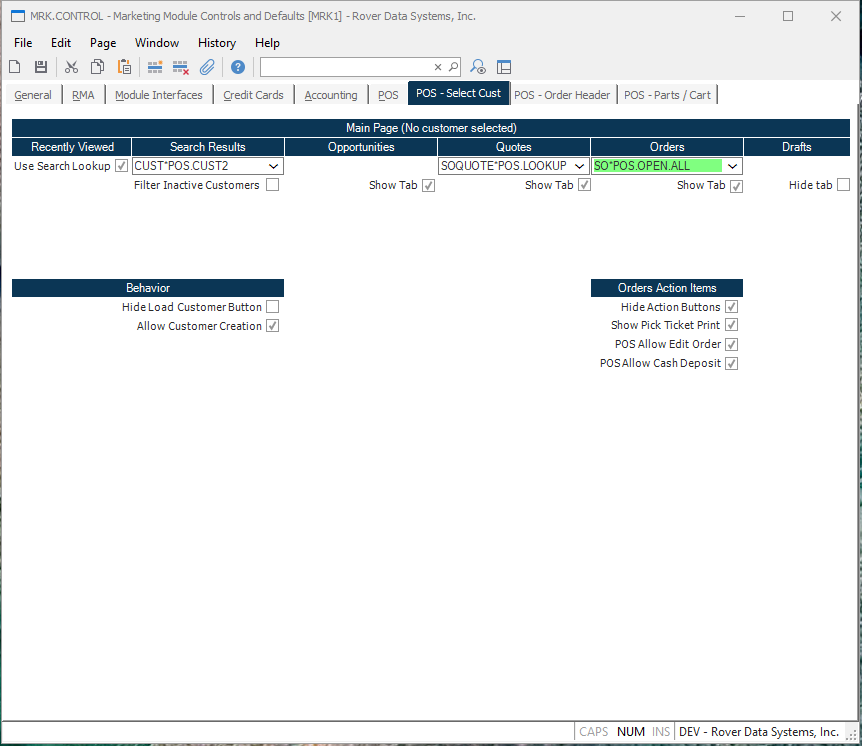
Overview
These controls are used to configure the Rover Web POS customer selection page.
Main Page
Recently Viewed
Search Results
Customer Lookup The Customer Lookup tab is used to replace the customer table with a lookup table in the POS main customer tab.
Filter Inactive Customers Checking this box will filter inactive customers from the search results.
Opportunities
Quotes
Orders
Drafts
Behavior
Hide Load Customer Button Checking this box will hide the load customer button in the main customer search screen.
Allow Customer Creations Checking this box will add a "New Customer" button next to the customer search and allow customer creation when a search result returns empty.
Order Action Items
Hide Action Buttons Checking this box will hide the actions buttons that appear on the right side of the orders tables.
POS Allow Edit Order Checking this box will add the ability to edit an order within POS.
POS Allow Cash Deposit
Checking this box will add the ability to add a deposit for a sales order.
Version 1.7.19.0