Skip to content

Resolving ServicesClientTcp.ExecuteService Errors in RoverERP Due to Virus Blockers

Administration

Problem Statement

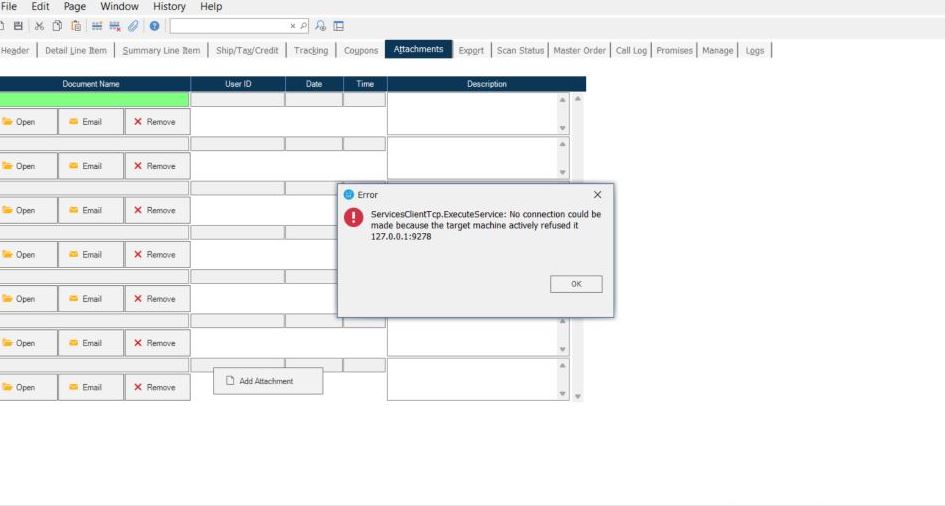
Users encounter errors related to ServicesClientTcp.ExecuteService when using RoverERP. This issue may be caused by antivirus or endpoint protection software blocking necessary application components.


Symptoms

  • Error messages referencing ServicesClientTcp.ExecuteService appear during application use
  • RoverERP features may fail to load or function properly
  • The issue may coincide with recent changes or updates to antivirus or endpoint protection software

Cause

  • Antivirus or endpoint protection software (for example, SentinelOne) is blocking or interfering with RoverERP network or service communication
  • Required application files or network traffic are being quarantined or restricted by security software

So E


Resolution Steps

1. Identify the Security Software

  • Determine which antivirus or endpoint protection software is installed on the affected system (for example, SentinelOne)

2. Check Security Logs

  • Review the security software logs or quarantine list for any actions taken against RoverERP files or processes

3. Whitelist RoverERP Components

  • Add RoverERP application files and network processes to the security software whitelist or allow list
  • Ensure that all necessary ports and services used by RoverERP are permitted

4. Restart the Application

  • After updating security settings, restart RoverERP and verify if the error persists

5. Contact IT or Security Team if Needed

  • If you are unable to modify security settings, contact your IT or security administrator for assistance

Verification

  • [ ] Confirm that ServicesClientTcp.ExecuteService errors no longer appear
  • [ ] Ensure all RoverERP features and services function as expected

Note

  • Always coordinate with your IT or security team before making changes to antivirus or endpoint protection settings
  • Regularly update both RoverERP and your security software to maintain compatibility

Additional Information

  • For persistent issues, provide details of the error and security software to RoverERP support for further troubleshooting
  • Document any changes made to security settings for future reference