
Appearance
Managing Procedure Access Rights with SECURITY.E3 in RoverERP
1 min read
Administration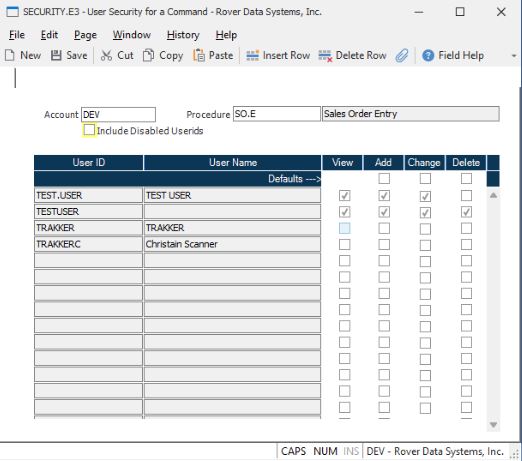
Resolution Steps
Access SECURITY.E3
Navigate to: Security > SECURITY.E3.
Specify Account and Procedure
Enter the name of the account and the procedure for which you want to manage access rights.
Review Current User Access
A list of all users with current access to the specified procedure will be displayed.
Update Access Rights
- Modify the access rights for existing users as needed.
- Add additional users who require access to the procedure.
- Remove users who should no longer have access.
Save Changes
After making the necessary updates, save the procedure. All user security settings for the specified procedure will be updated accordingly.