
# Resolving ServicesClientTcp.ExecuteService Errors in RoverERP Due to Virus Blockers
Read Time: 2 minute(s)
# Problem Statement
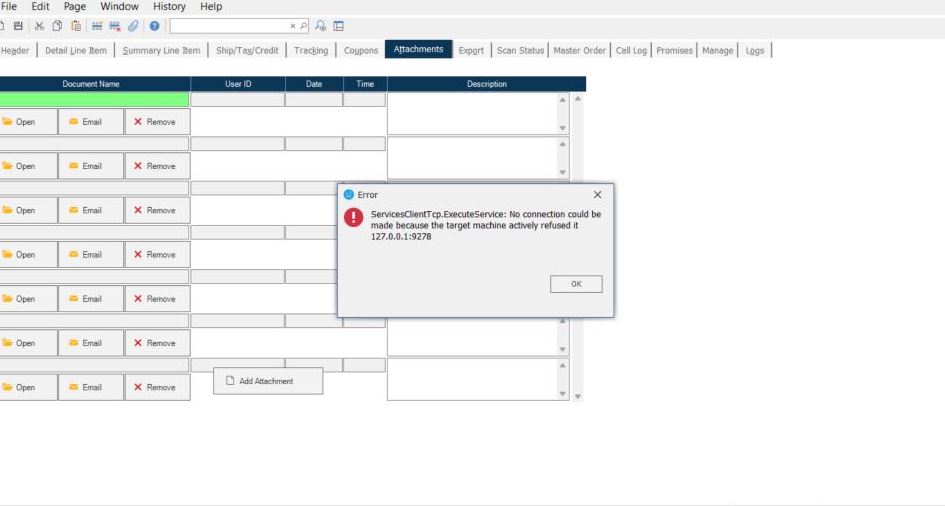
Users encounter errors related to ServicesClientTcp.ExecuteService when using RoverERP. This issue may be caused by antivirus or endpoint protection software blocking necessary application components.
# Symptoms
- Error messages referencing ServicesClientTcp.ExecuteService appear during application use
- RoverERP features may fail to load or function properly
- The issue may coincide with recent changes or updates to antivirus or endpoint protection software
# Cause
- Antivirus or endpoint protection software (for example, SentinelOne) is blocking or interfering with RoverERP network or service communication
- Required application files or network traffic are being quarantined or restricted by security software
# Resolution Steps
# 1. Identify the Security Software
- Determine which antivirus or endpoint protection software is installed on the affected system (for example, SentinelOne)
# 2. Check Security Logs
- Review the security software logs or quarantine list for any actions taken against RoverERP files or processes
# 3. Whitelist RoverERP Components
- Add RoverERP application files and network processes to the security software whitelist or allow list
- Ensure that all necessary ports and services used by RoverERP are permitted
# 4. Restart the Application
- After updating security settings, restart RoverERP and verify if the error persists
# 5. Contact IT or Security Team if Needed
- If you are unable to modify security settings, contact your IT or security administrator for assistance
# Verification
- [ ] Confirm that ServicesClientTcp.ExecuteService errors no longer appear
- [ ] Ensure all RoverERP features and services function as expected
# Note
- Always coordinate with your IT or security team before making changes to antivirus or endpoint protection settings
- Regularly update both RoverERP and your security software to maintain compatibility
# Additional Information
- For persistent issues, provide details of the error and security software to RoverERP support for further troubleshooting
- Document any changes made to security settings for future reference