
# Managing Account Services with SERVICE.CONTROL in RoverERP
Read Time: 2 minute(s)
# Problem Statement
Administrators need to view and manage scheduled services for all accounts defined in ACCOUNT.CONTROL, including scheduling procedures such as daily backups and nightly module updates.
# Symptoms
- Need to schedule, view, or manage automated procedures across multiple accounts
- Requirement to ensure critical services (e.g., backups, updates) run on a defined schedule
- Desire to manage services regardless of the currently logged-in account
# Cause
- SERVICE.CONTROL provides centralized management of account services and scheduled procedures
- Batch queue jobs must be defined within the specific account where they are to run
# Resolution Steps
Access SERVICE.CONTROL
Navigate to: ACE Utilities > SERVICE.CONTROL.
View and Manage Services
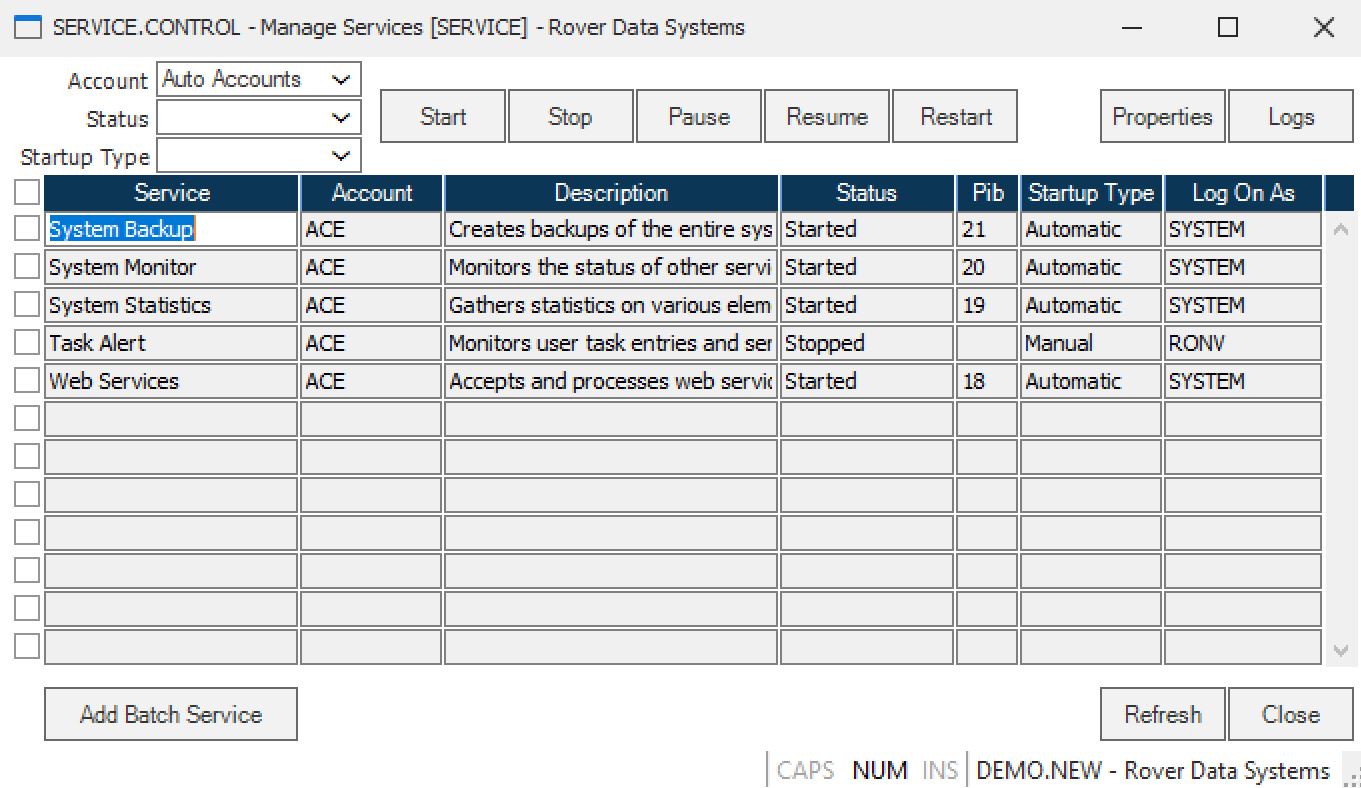
SERVICE.CONTROL displays all services for accounts defined in ACCOUNT.CONTROL. You can view, start, stop, or modify services for any account, regardless of your current login account.
Schedule Procedures
Define schedules for procedures (e.g., daily backups, nightly updates) according to your organization's requirements. Use the scheduling options within SERVICE.CONTROL to set up when and how often each procedure should run.
Defining Batch Queue Jobs
- Batch queue jobs are account-specific
- Log into the account where the batch job should run before defining and setting up the job
Accessing Help
For detailed information on any field, place the cursor in the field and press F1 (help key). Context-sensitive help will be displayed.
# Verification
- [ ] Confirm that all required services are scheduled and running as intended
- [ ] Verify that batch queue jobs are defined in the correct accounts and execute on schedule
- [ ] Check logs or status screens to ensure procedures (e.g., backups, updates) complete successfully
# Note
- Use SERVICE.CONTROL for centralized management of all account services
- Always define batch queue jobs within the account where they are to be executed
# Additional Information
- For more detailed instructions, use the F1 help feature within SERVICE.CONTROL
- Contact your system administrator or RoverERP support for assistance with complex scheduling or troubleshooting